Windows
x64 installer
The Windows installer is on its way.
'/%3e%3cpath%20d='M354%20600%20V700%20L262%20792%20M512%20600%20V800%20M670%20600%20V700%20L762%20792%20M676%20282%20V196'%20fill='none'%20stroke='%233A4152'%20stroke-width='34'%20stroke-linecap='round'%20stroke-linejoin='round'/%3e%3ccircle%20cx='676'%20cy='176'%20r='34'%20fill='url(%23iiot-body)'/%3e%3crect%20x='236'%20y='270'%20width='552'%20height='340'%20rx='76'%20fill='url(%23iiot-body)'/%3e%3cg%20fill='%230B3B2A'%3e%3ccircle%20cx='330'%20cy='368'%20r='24'/%3e%3ccircle%20cx='406'%20cy='368'%20r='24'%20opacity='.55'/%3e%3crect%20x='306'%20y='446'%20width='300'%20height='36'%20rx='18'%20opacity='.7'/%3e%3crect%20x='306'%20y='512'%20width='180'%20height='36'%20rx='18'%20opacity='.45'/%3e%3c/g%3e%3ccircle%20cx='482'%20cy='368'%20r='24'%20fill='%235FE08A'/%3e%3crect%20x='190'%20y='728'%20width='144'%20height='144'%20rx='40'%20fill='url(%23iiot-body)'/%3e%3ccircle%20cx='512'%20cy='812'%20r='76'%20fill='url(%23iiot-body)'/%3e%3cpath%20d='M762%20718%20L838%20794%20L762%20870%20L686%20794%20Z'%20fill='url(%23iiot-body)'/%3e%3c/svg%3e)
Read a register, browse a server and watch a broker in one window, with one project of tags across all three. When a gateway carries a value from one protocol to the next, IIoT Studio checks it end to end and names what went wrong. Fast, local, and the same on macOS, Windows and Linux.
Three protocols, one window
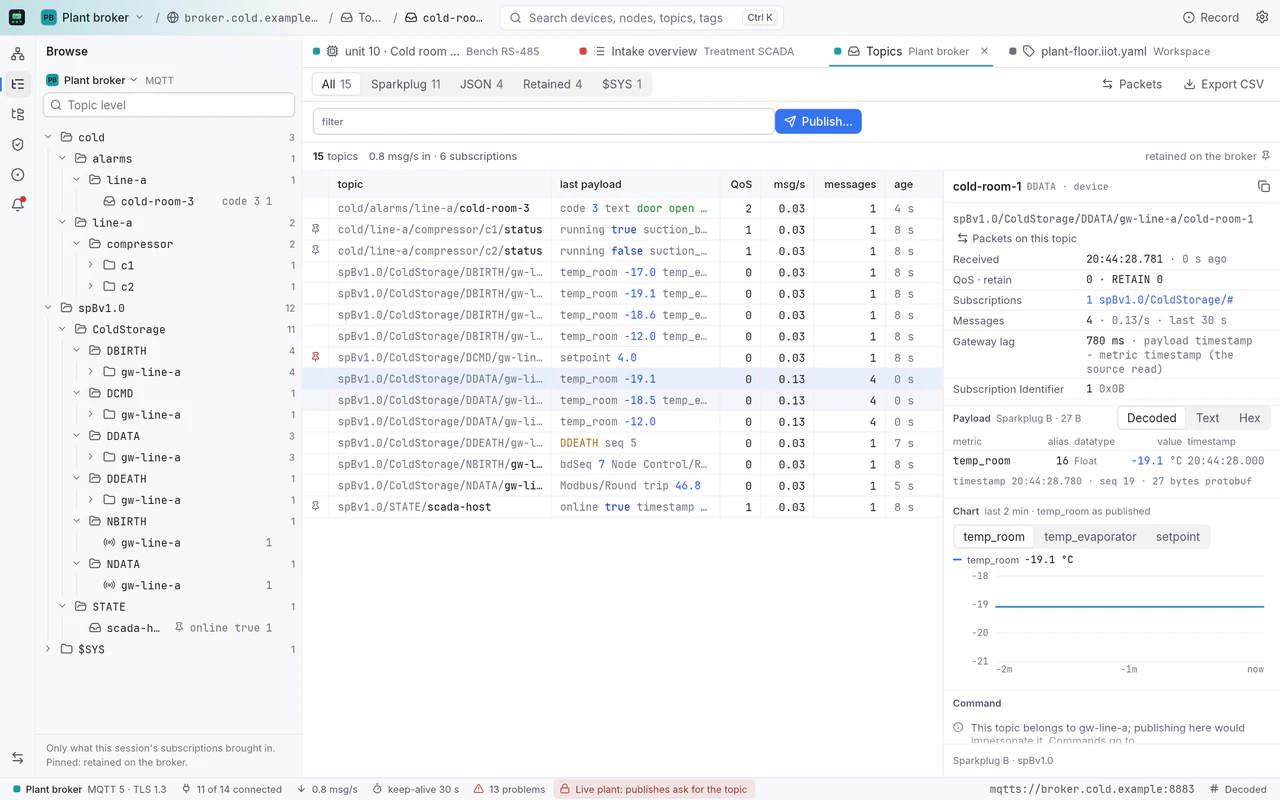
Not a generic tag browser. Each protocol gets the depth of a dedicated tool, in the same window as the other two: the bus, the session and the broker traffic stay in reach.
Serial lines and Ethernet devices
Serial RTU · Modbus TCP · RTU over TCP · SSH bastion
Servers, security and history
opc.tcp · None, Sign, SignAndEncrypt · Anonymous, UserName, X.509
Brokers and Sparkplug B
3.1.1 and 5.0 · TCP and TLS, mutual TLS optional · Sparkplug B
plant-floor.iiot.yamlOne project: sites, connections and named tags across all three protocols, in a file you keep in git.
The gateway check
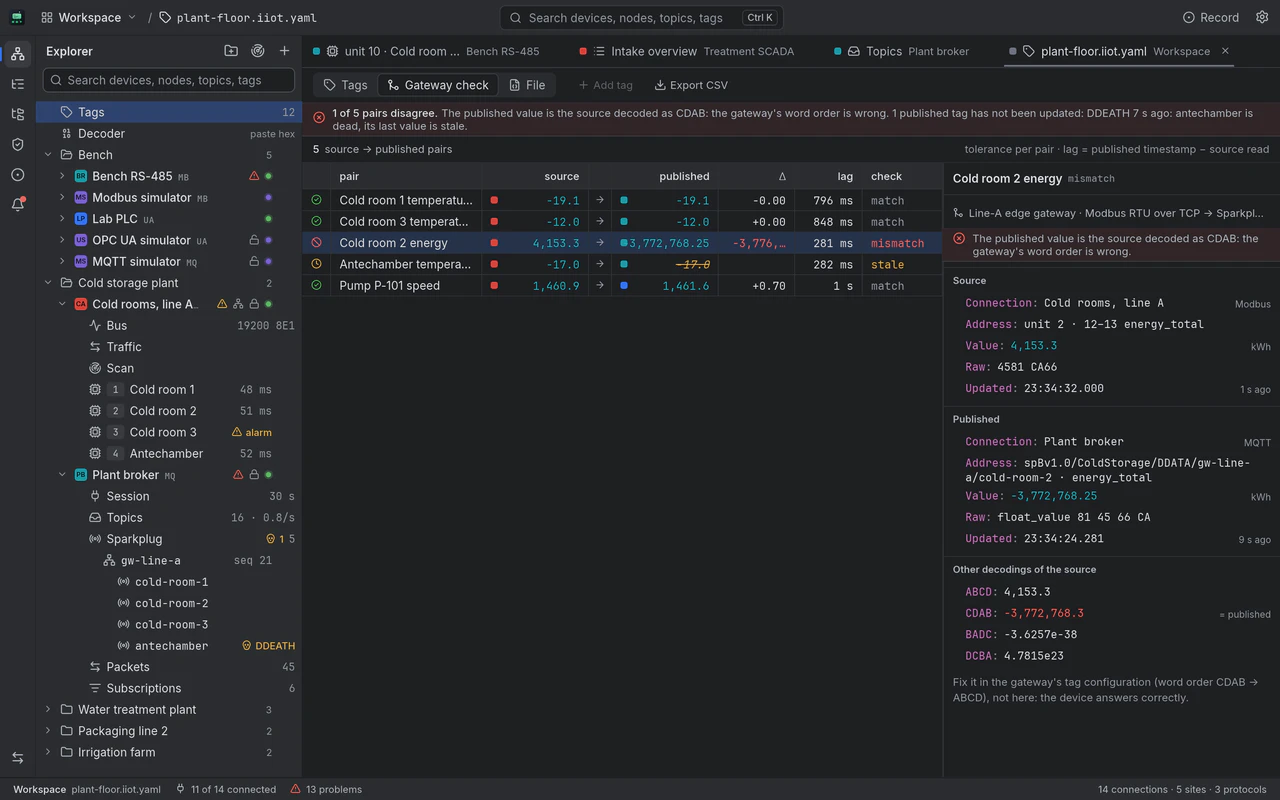
Plants rarely speak one protocol. A meter talks Modbus, a gateway republishes it on MQTT, SCADA reads it over OPC UA. IIoT Studio reads both ends of every hop and says which one is wrong, and why.
Cold room 2's meter answers on Modbus, RTU over TCP: unit 2, registers 12 and 13, the words 4581 CA66. In the map's ABCD order that is 4,153.3 kWh.
The line-A edge gateway polls the meter and publishes energy_total as a Sparkplug B metric on the plant broker.
On MQTT the metric arrives as −3,772,768.25 kWh. Both reads are project tags, paired in plant-floor.iiot.yaml with a tolerance of 0.5.
The gateway check tries the source in every word order. CDAB gives exactly what was published, so the fault is the gateway's configuration, not the device.
unit 2 · 12–13 energy_total
4581 CA66
4,153.3 kWh
spBv1.0/ColdStorage/DDATA/gw-line-a/cold-room-2 · energy_total
float_value 81 45 66 CA
−3,772,768.25 kWh
| ABCD | 4,153.3 | the map |
|---|---|---|
| CDAB | −3,772,768.3 | = published |
| BADC | −3.6257e-38 | |
| DCBA | 4.7815e23 |
The published value is the source decoded as CDAB: the gateway's word order is wrong. Fix it in the gateway's tag configuration, not here: the device answers correctly.
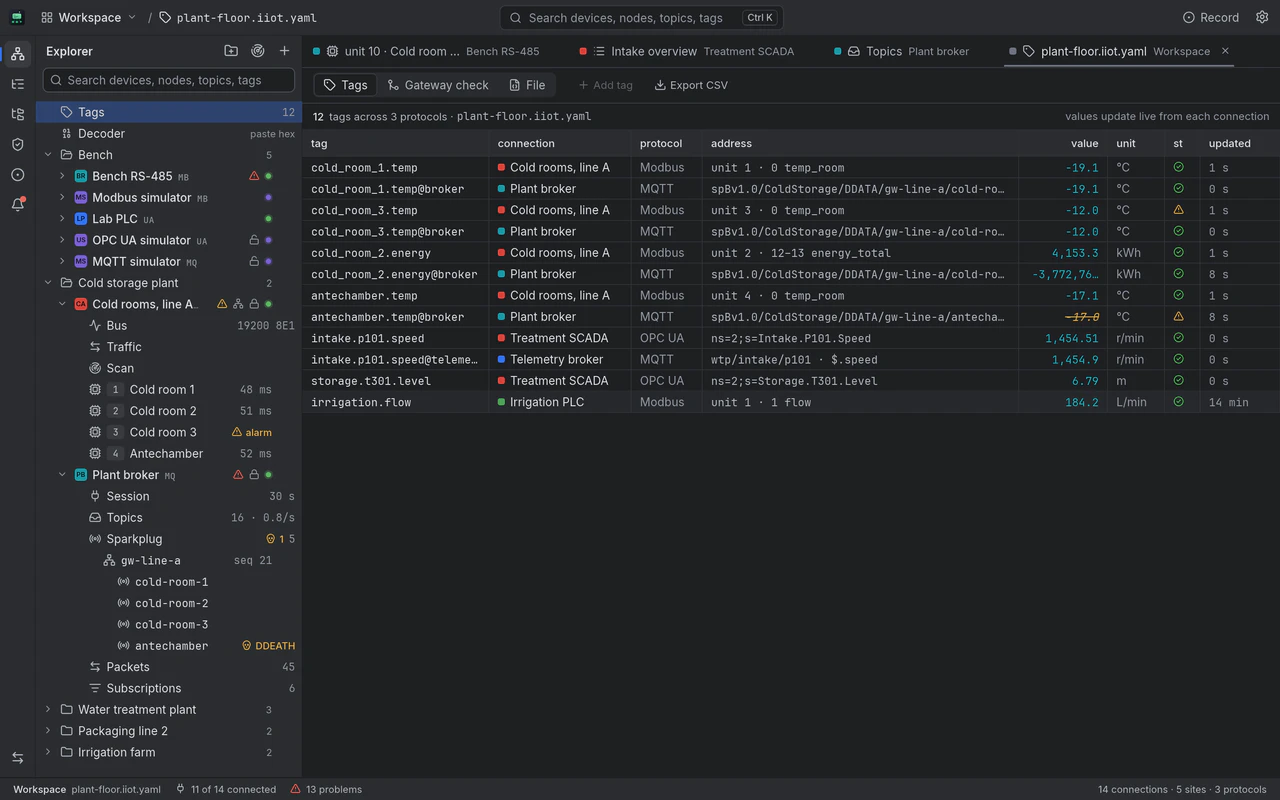
The tags behind the check, live from their connections: Modbus registers, OPC UA nodes and MQTT metrics side by side. On the sample plant two pairs match, cold room 2's energy is the CDAB mismatch, the antechamber is stale after its edge node sent DDEATH, and pump P-101's speed matches across an OPC UA to MQTT bridge.
A Modbus register, the OPC UA node that mirrors it and the MQTT metric a gateway publishes from it sit in one watch list, by name.
A site holds its serial lines, servers and brokers together, each connection with its own identity color.
Paste a Modbus frame, an OPC UA chunk, an MQTT packet or a Sparkplug payload: the Decoder detects which it is and reads it field by field.
The wire is visible
The bus, the session and the broker traffic are one click away, for every protocol. Every screen here is the app itself, running on its fictional sample plant.
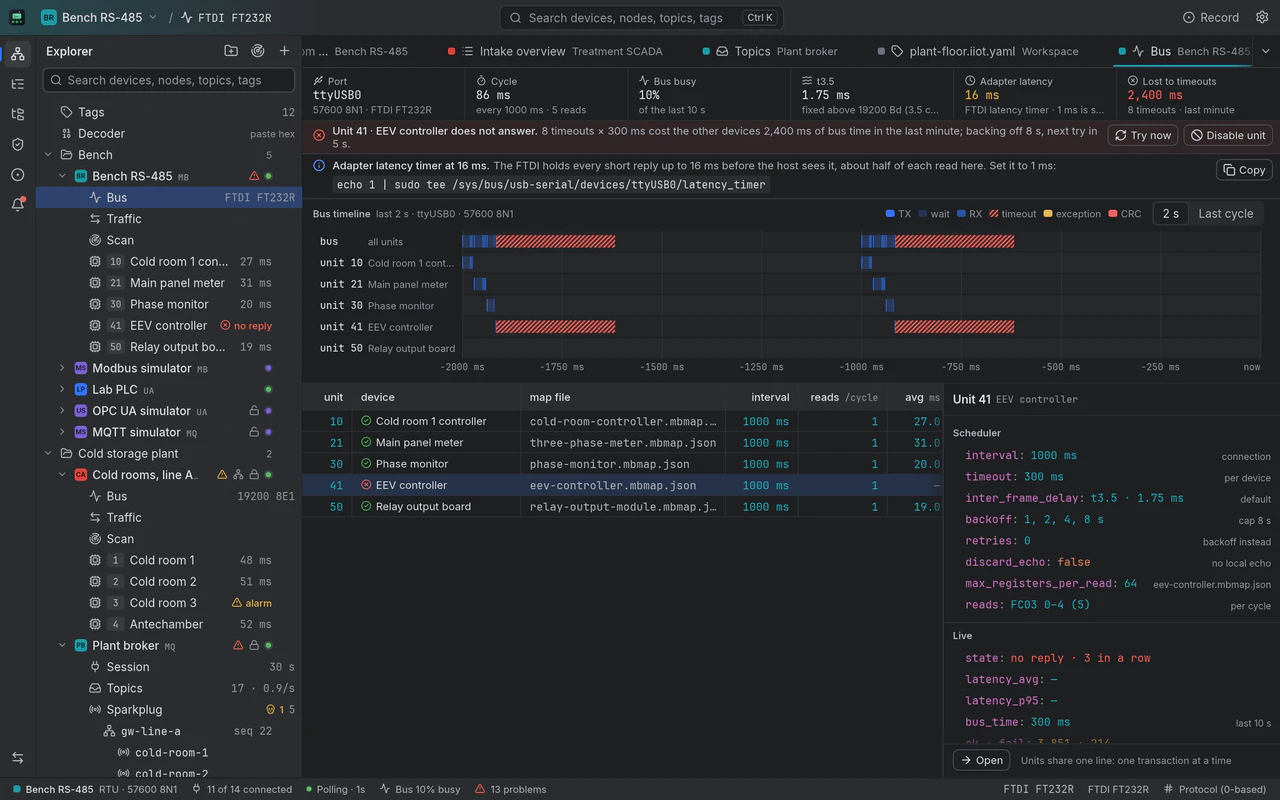
Every serial line has a scheduler, and the bus view shows it: transmit, wait and receive per unit on a timeline, bus occupancy, the t3.5 gap, timeouts, and the backoff of a unit that stopped answering.
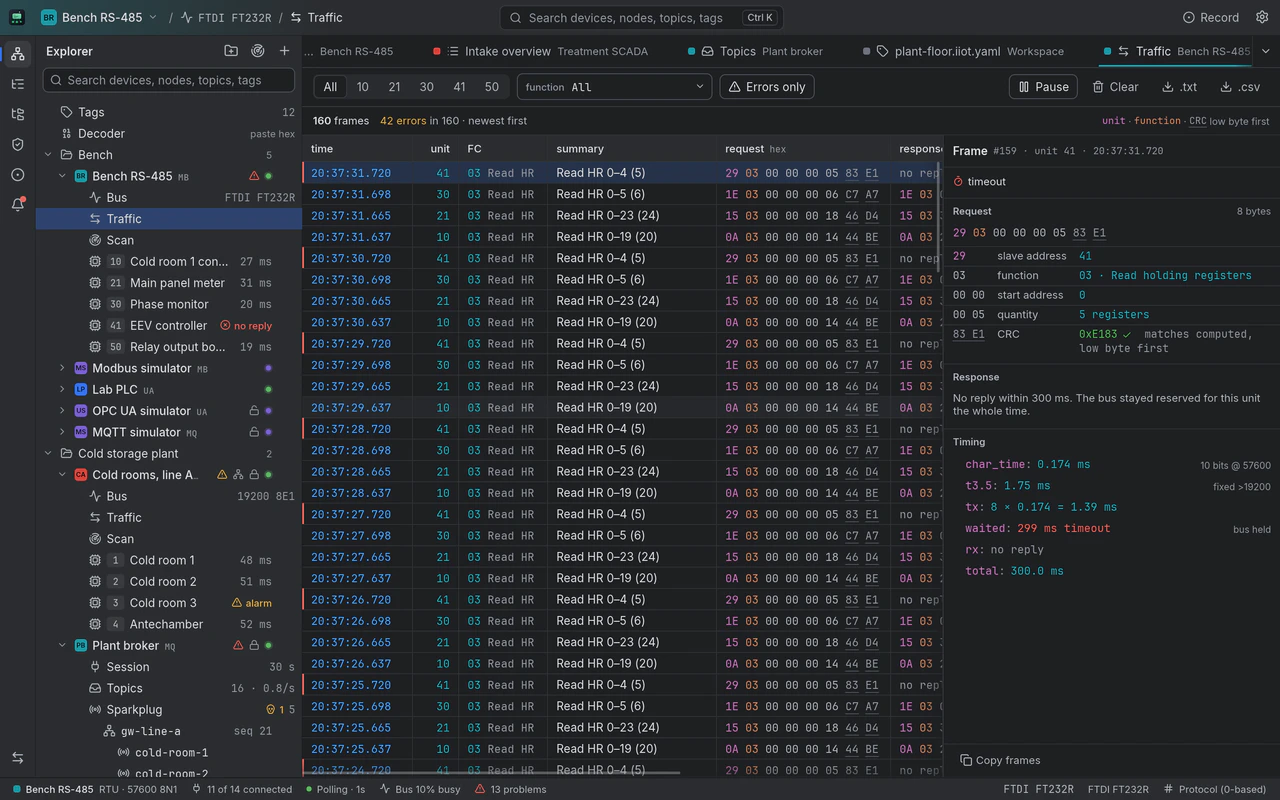
Every frame on the connection, newest first, filtered by unit, function code or errors only. Select one and it is decoded field by field, its CRC checked against the one computed.
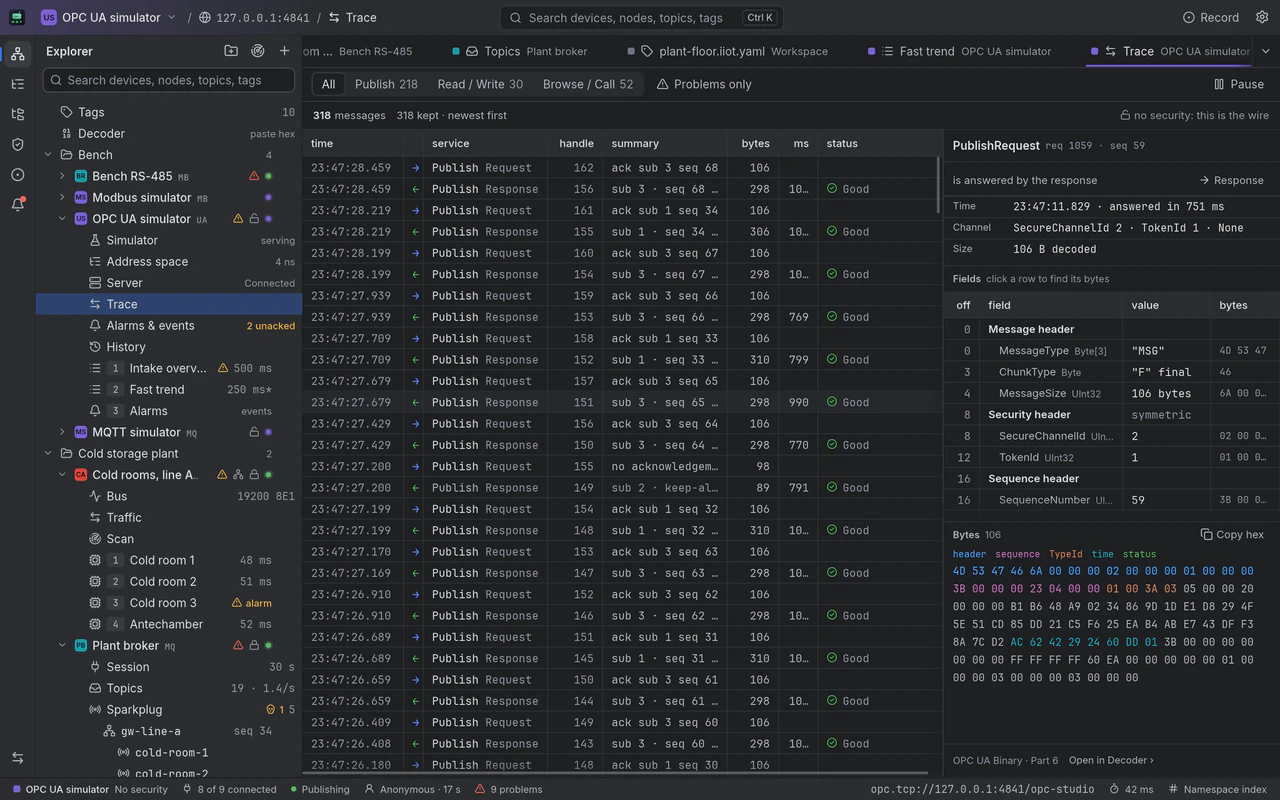
Every message the session sent and received: the service, its request handle, size, round trip and status code. Select one and it is decoded field by field next to its bytes.
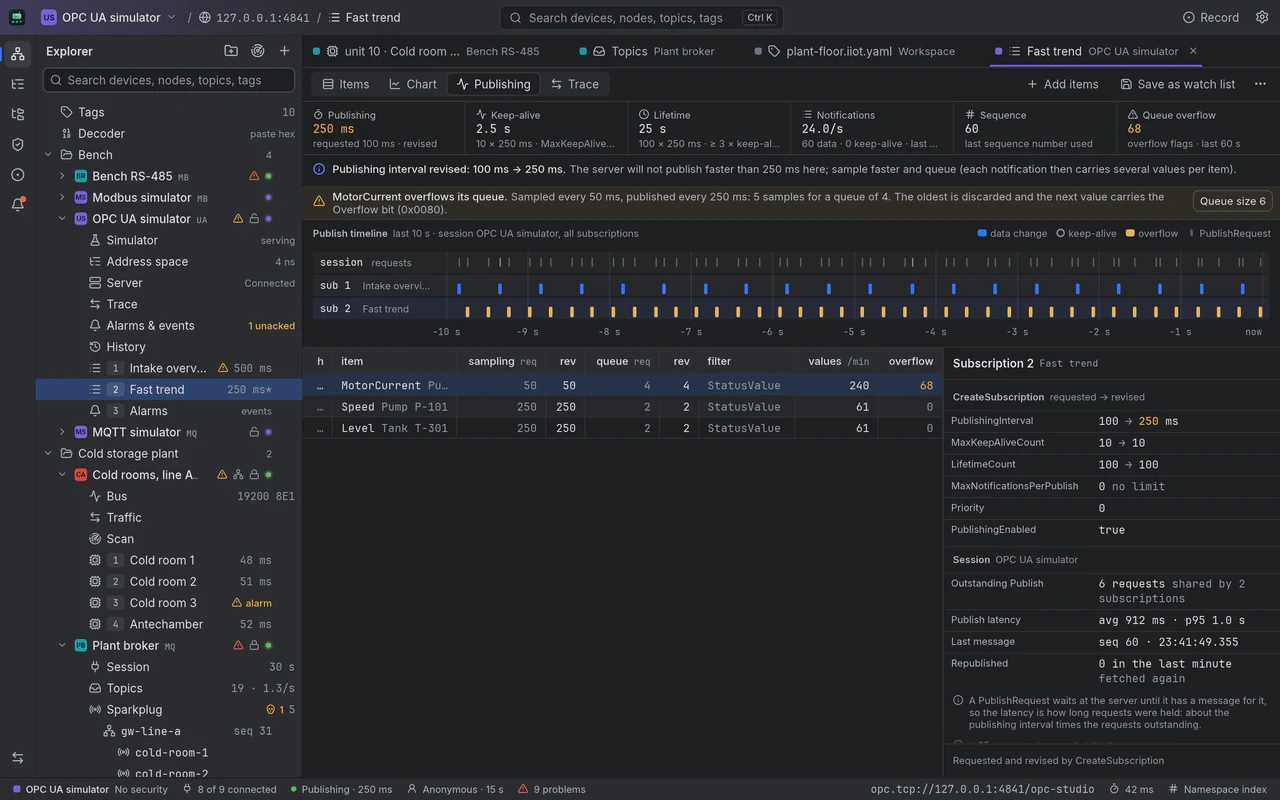
What you asked for and what the server granted: the publishing interval, keep-alive and lifetime, sampling and queue sizes, revised values called out, queue overflows warned, and the publishing loop on a timeline.
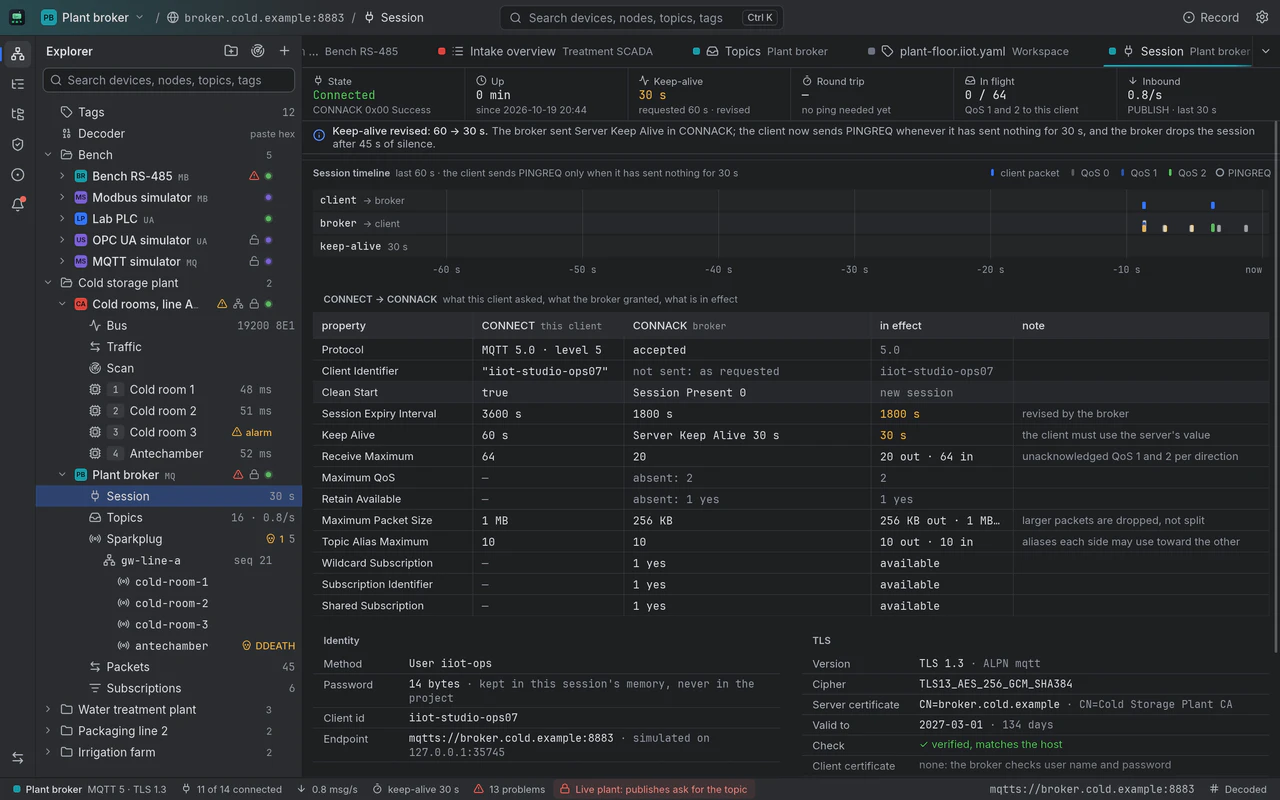
CONNECT against CONNACK, property by property: what the client asked, what the broker granted and what is in effect, with keep-alive pings, flow control and the TLS in use.
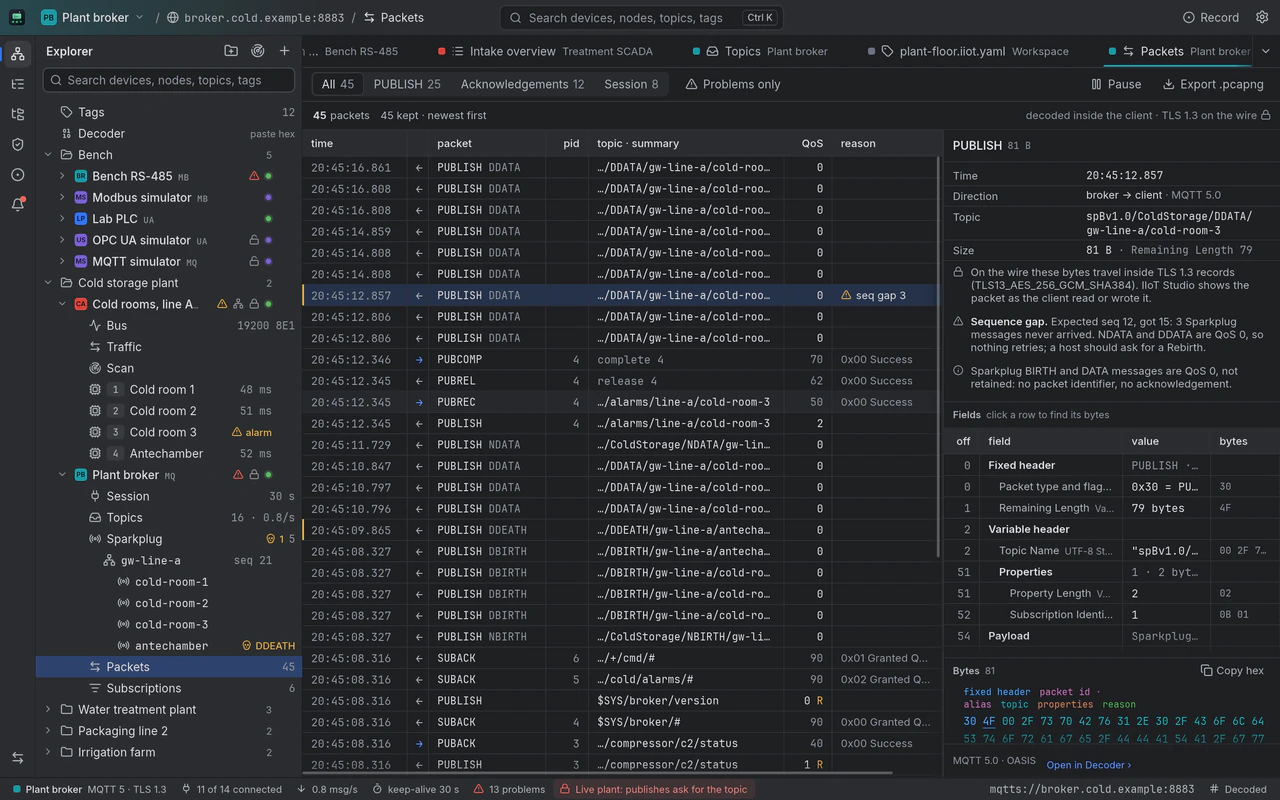
Every packet on the session, both ways, with its packet id, QoS and reason code, the QoS 2 handshake in full, and a Sparkplug sequence gap flagged. Select one and its bytes are laid out field by field.
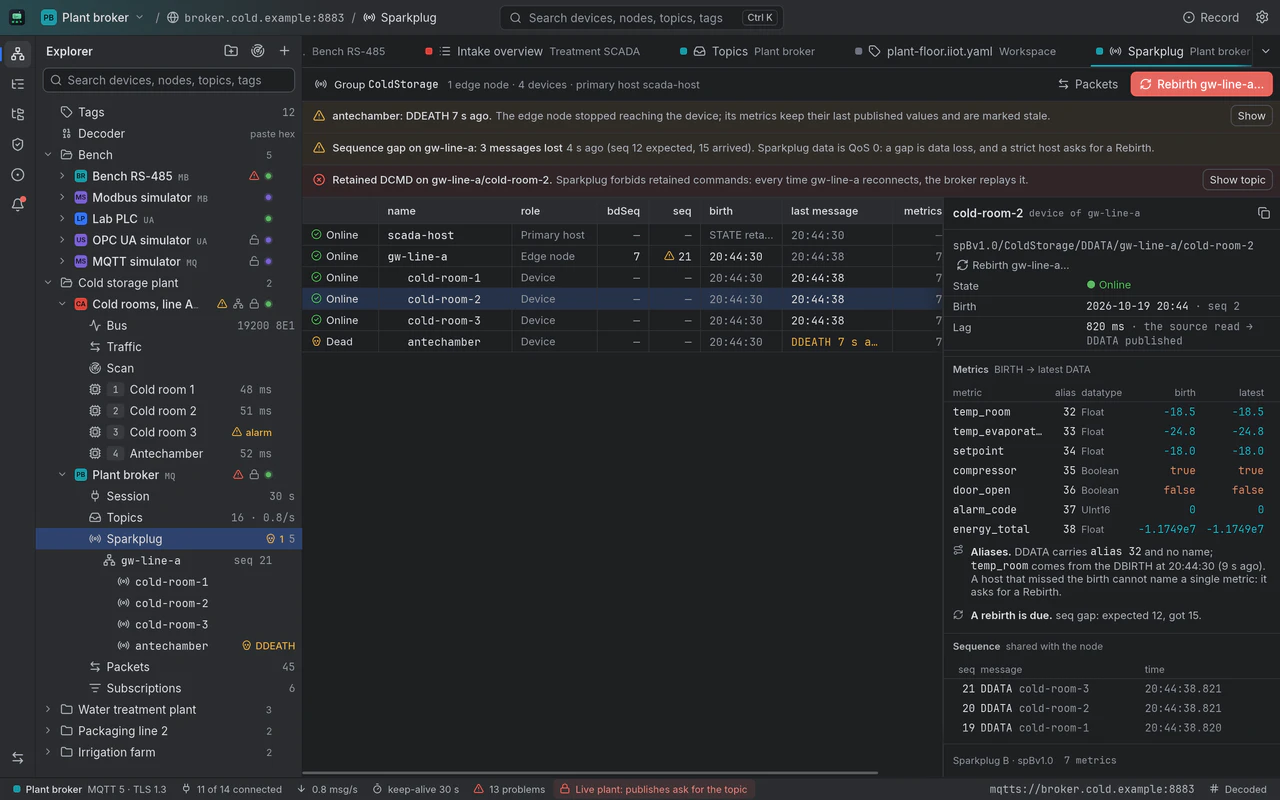
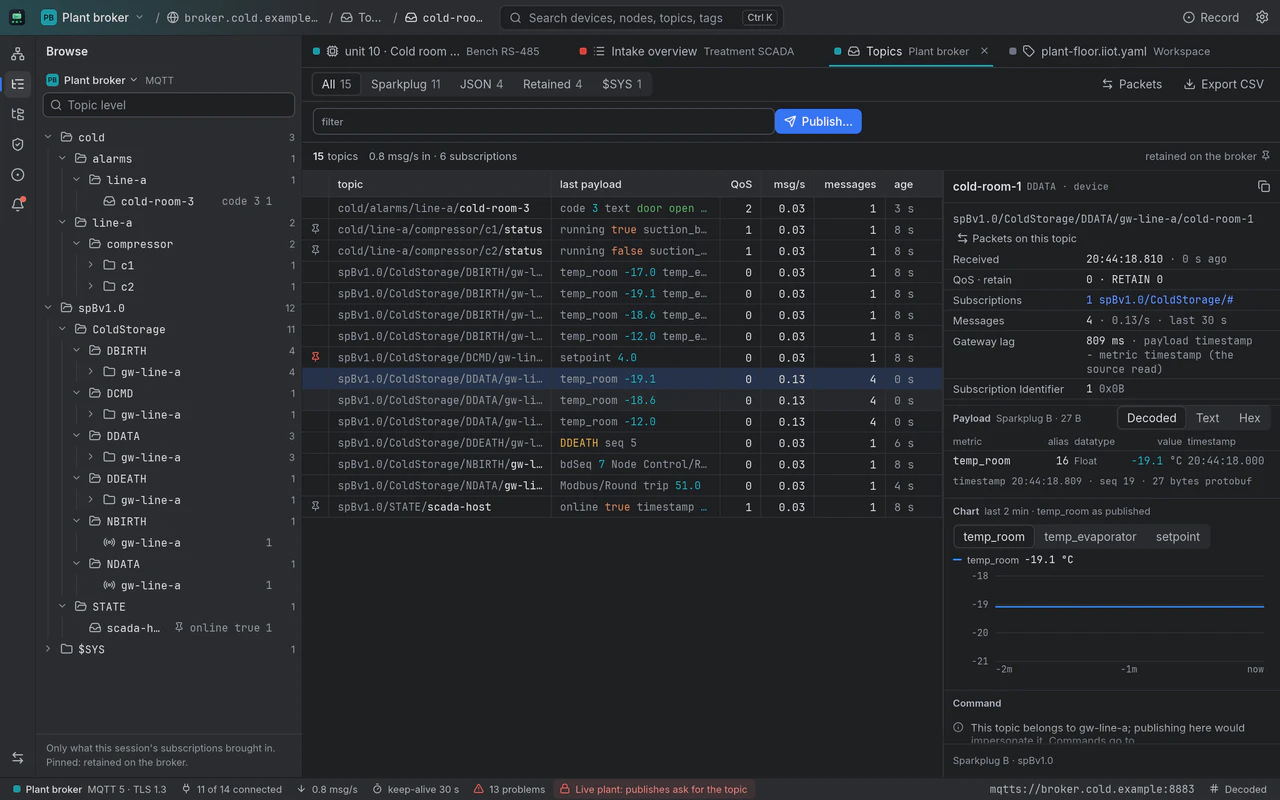
Edge nodes and devices with their births and deaths, sequence numbers and bdSeq, metrics resolved from their aliases by name, a dead device flagged before its stale values fool anyone, and a retained command called out.
Healthy fear
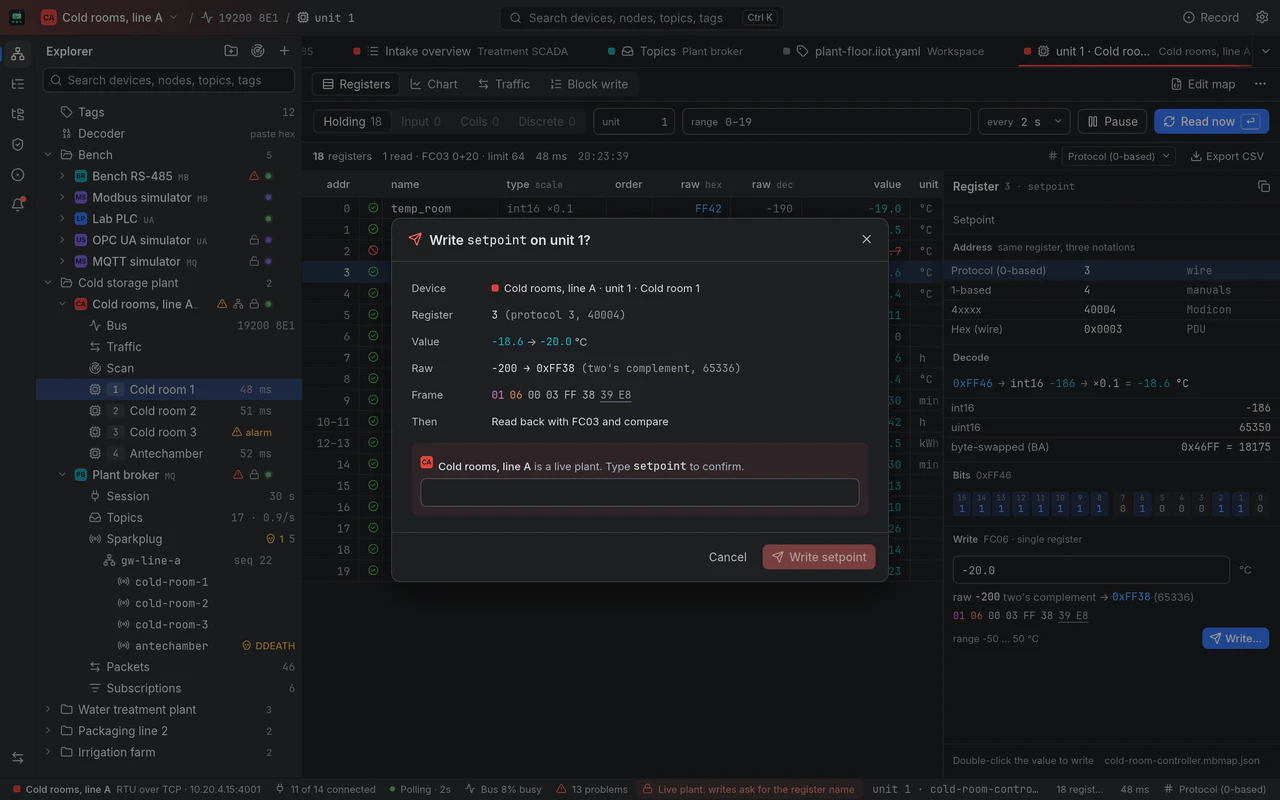
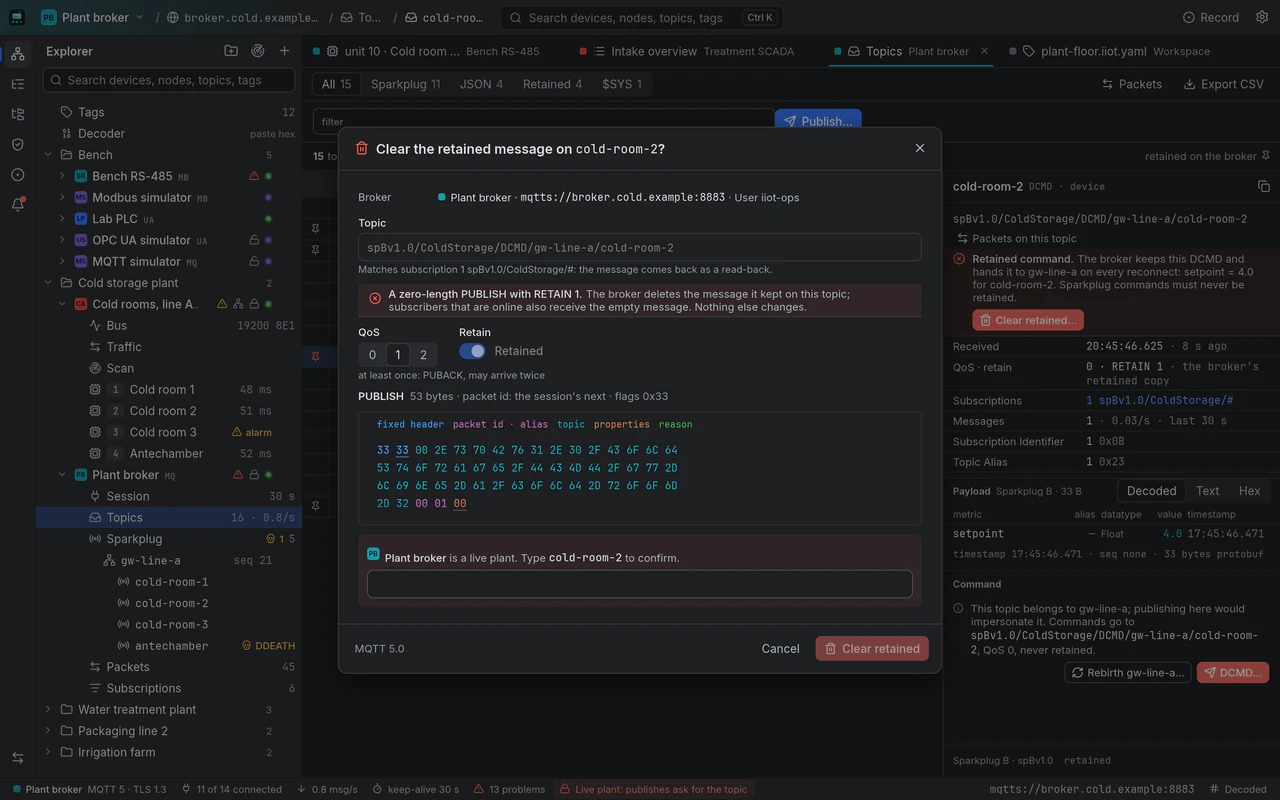
A write moves equipment, and so does a publish. Mark a connection as a live plant and its color tints the toolbar and the status bar, and every write, call and publish asks first, shows the raw value and reads back.
On a live plant a write asks for the register's name before the button works, previews the raw value (in two's complement for a negative number) and the frame it will send, and reads the register back after writing.
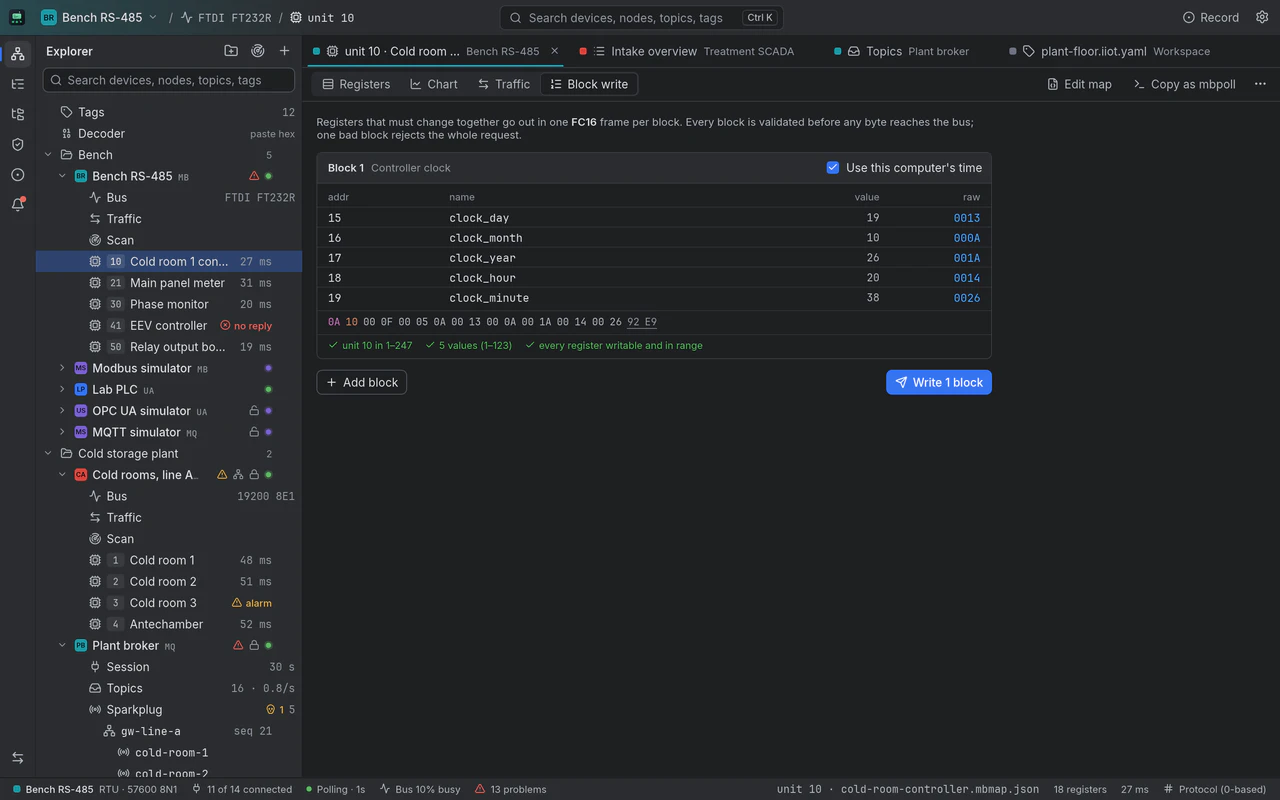
Registers that must change together go out in one FC16 frame per block. Every block is validated before any byte reaches the bus, and a block aimed at the broadcast address is refused.
A write names the server and the node, shows the value and the Variant bytes it will send, then reads the value back with MaxAge 0. On a live plant, writes and method calls ask for the node's name first.
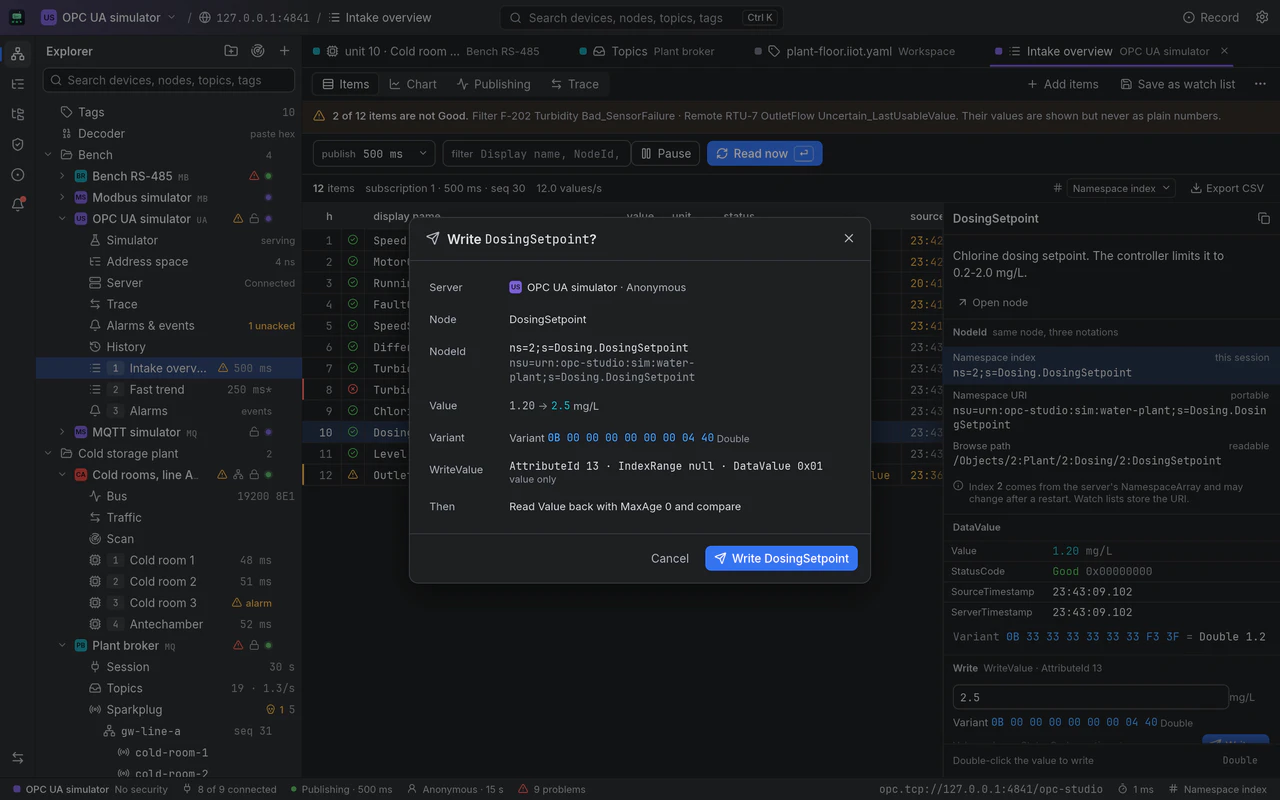
A publish shows the broker, the topic and the subscription that will read it back, QoS and Retain with what they mean, and the PUBLISH's bytes. A retained message outlives the session, so it says so; on a live plant it waits for the topic's name.
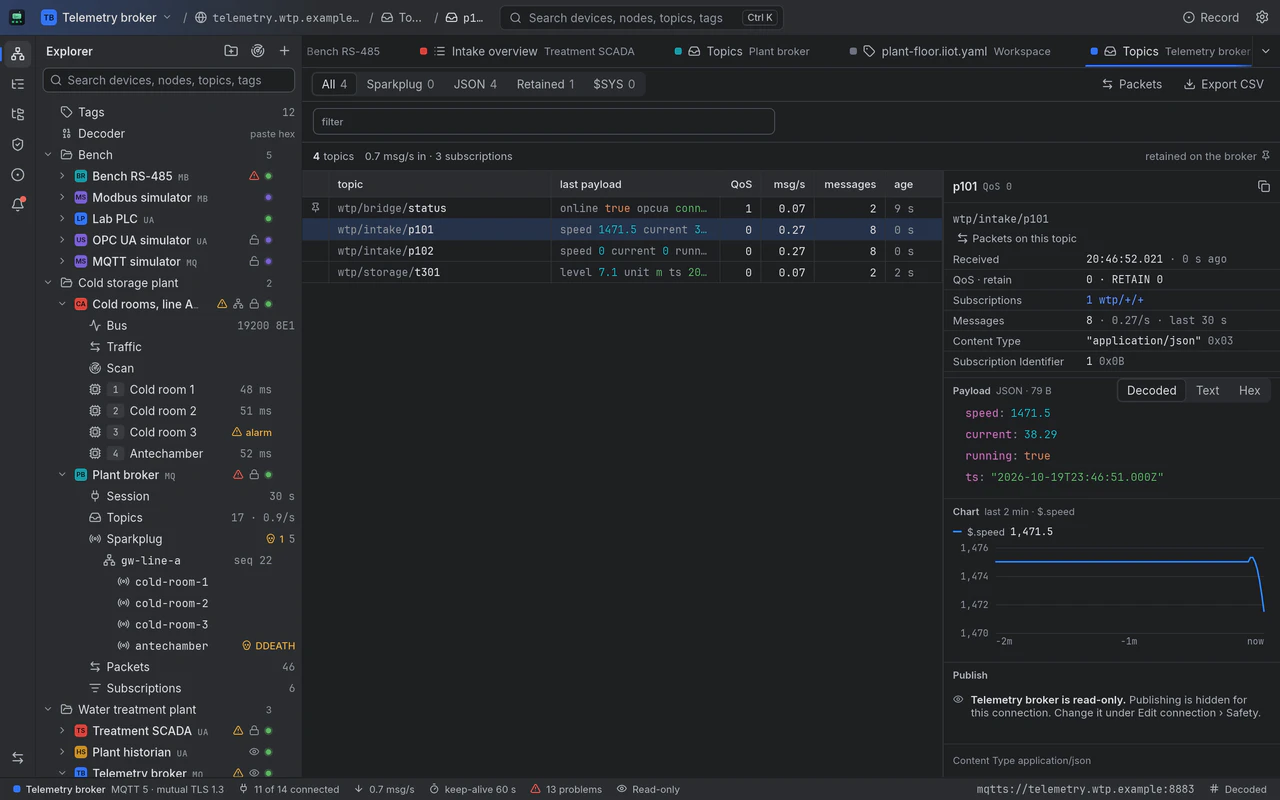
Mark a connection read-only and every write, call, acknowledge and publish disappears from it. Browse, decode and chart all you want; nothing goes out.
Sites mix protocols
A serial line on the bench, an OPC UA server at the water plant and the broker a gateway publishes to sit in one explorer, grouped by the site they belong to, each with an identity color.
Cold storage plant
Water treatment plant
Bench
Packaging line 2 · Irrigation farm
Join the dialout group once (log out and back in after). Many USB serial adapters hold every short reply for 16 ms by default; lowering the latency timer to 1 ms speeds up every transaction, until the adapter is re-plugged.
sudo usermod -aG dialout $USERecho 1 | sudo tee /sys/bus/usb-serial/devices/ttyUSB0/latency_timerProjects are files
Sites, tags and gateway pairs are one text file; register maps, watch lists and topic maps sit next to it, owned by their protocols. Keep them in git, diff them, review the change that renamed a tag before it reaches the plant.
# IIoT Studio projectversion: 1name: Plant floorsites: - { id: cold, name: Cold storage plant }tags: - id: cr2.energy label: cold_room_2.energy connection: linea unit: 2 reg: 12 eu: kWh - id: cr2.energy.mq label: cold_room_2.energy@broker connection: broker topic: spBv1.0/ColdStorage/DDATA/gw-line-a/cold-room-2 metric: energy_total eu: kWhpairs: - id: g3 label: Cold room 2 energy source: cr2.energy published: cr2.energy.mq via: "Line-A edge gateway · Modbus RTU over TCP → Sparkplug B" tolerance: 0.5Simulators for all three
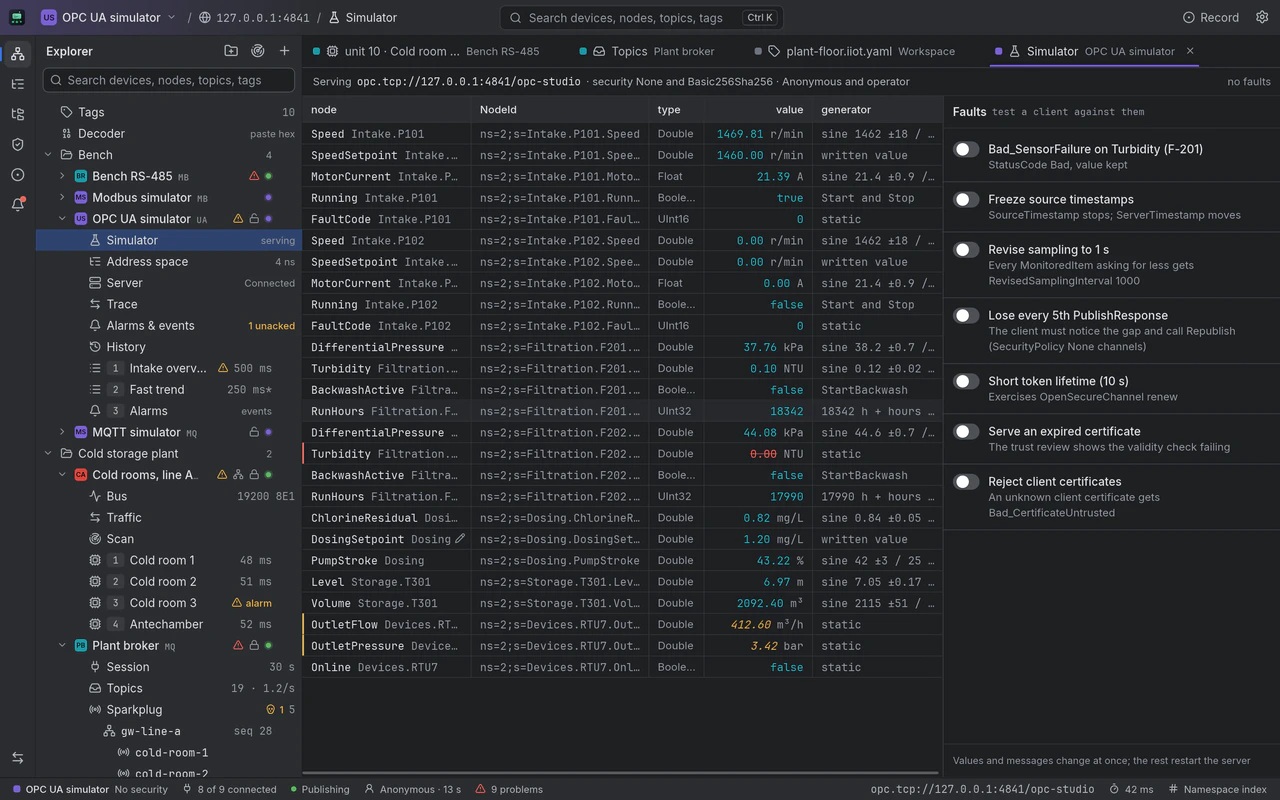
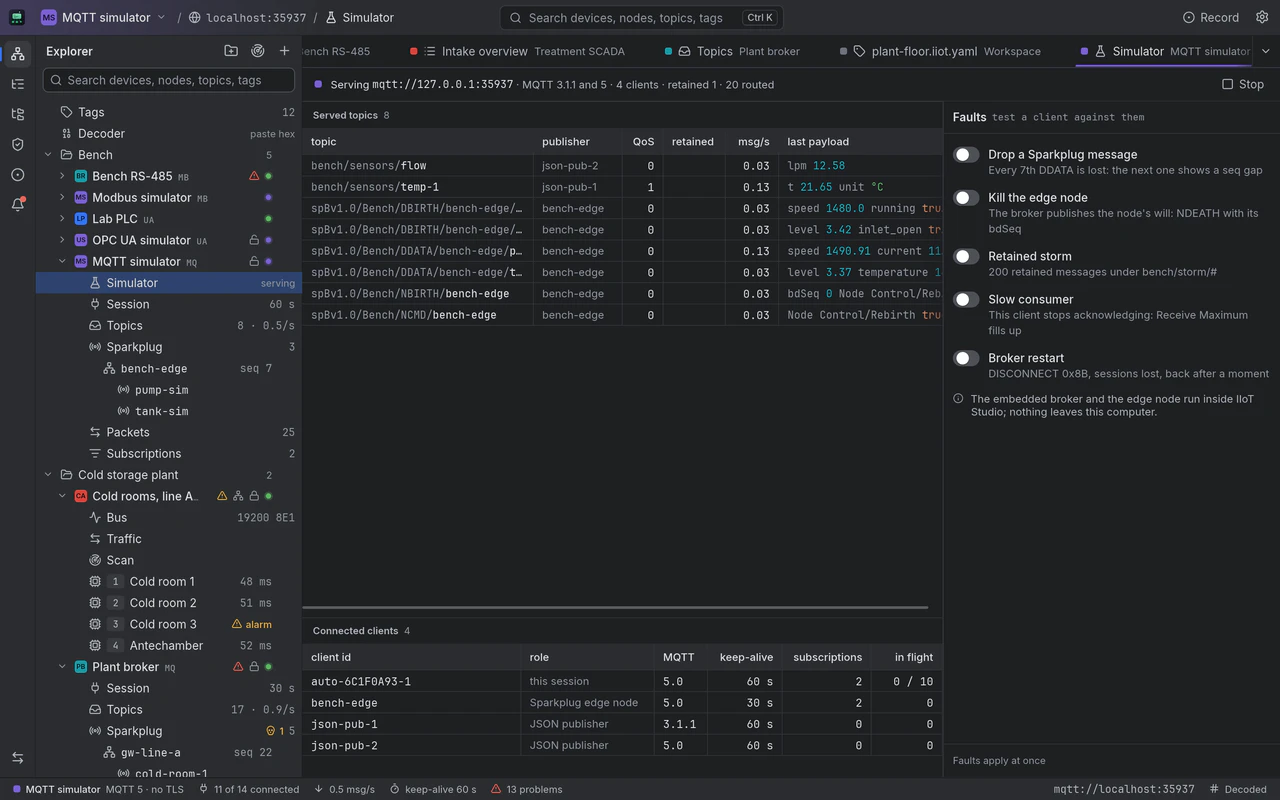
Every protocol ships a simulator inside the app, so the whole toolkit runs with no hardware: point a connection at it, then make it misbehave on purpose.
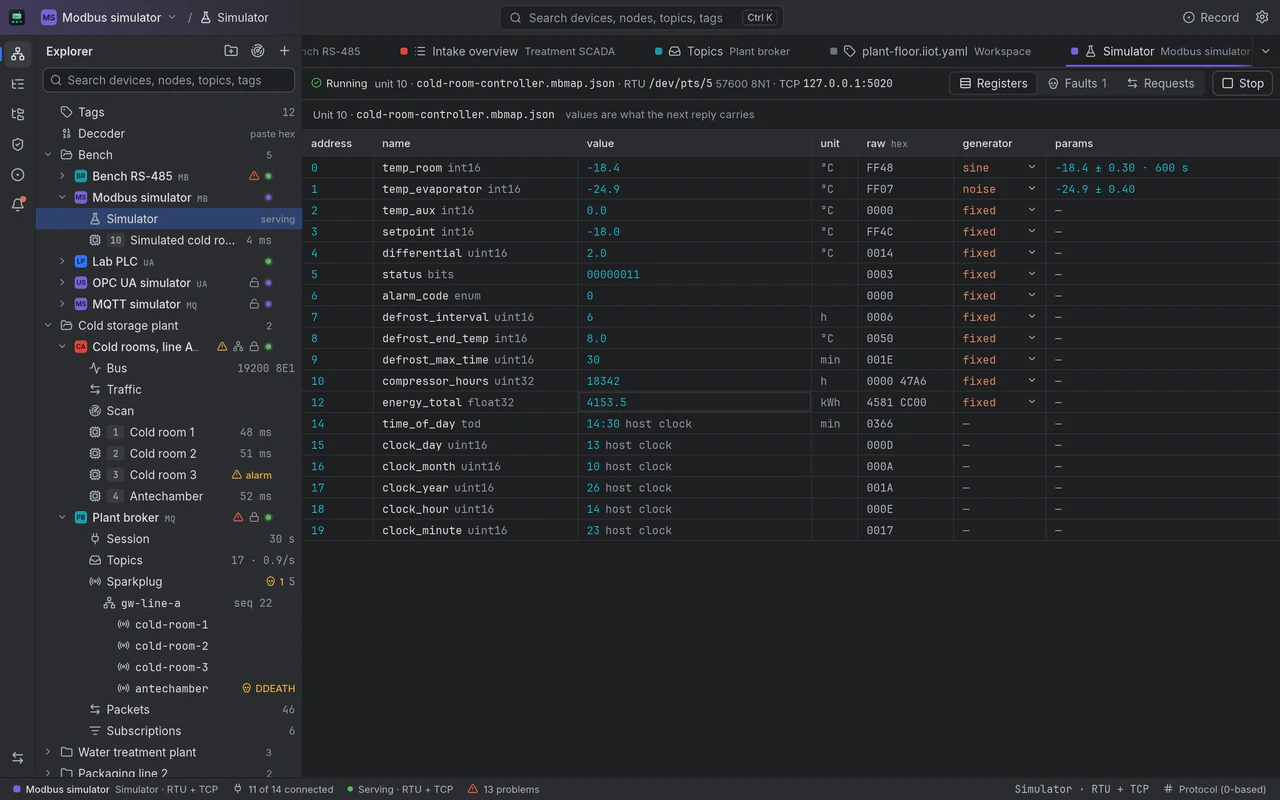
Serve any register map over TCP and, on Linux and macOS, over RTU on a virtual serial pair, with exceptions, delayed replies, silence and bad CRCs on demand.
An OPC UA server inside the app with a water plant's address space, methods, history and alarms, and faults for the cases a real server hides: a sensor failure, frozen timestamps, revised sampling, lost publish responses, an expired certificate.
A broker on a loopback port, MQTT 3.1.1 and 5, with a Sparkplug edge node and JSON publishers, and faults to switch on: drop a Sparkplug message, kill the edge node, a retained storm, a slow consumer, a broker restart.
Twin dark and light themes, dark by default, built to sit next to your IDE. Drag to compare the MQTT topic tree.
Version 0.1.0.
IIoT Studio is not released yet. Installers for Windows, macOS and Linux, and the apt repository, appear here as soon as the first build is out. Until then, every card below says what is coming.
x64 installer
The Windows installer is on its way.
Apple silicon
The disk image for Macs with Apple silicon is on its way.
x86_64
An apt repository, a .deb and an AppImage are on their way.
Builds are not code-signed yet, so the first launch shows a Gatekeeper warning on macOS and a SmartScreen warning on Windows.